370. Twitomate : Are you looking for a way to automate your tweet ? If you go out and you don’t have an access to internet. You think to let your followers know where will you be at particular time ? You can now automate your tweet with Twitomate. Just add your account here and tweet. Choose interval and deviation and it will automatically post your tweets on chosen time. You can also add multiple twitter account. More over you can write all your tweet (one tweet per line) in a .txt file and import it.
371. Tatatweet : Tatatweet is a simple tool to take a group of twitter accounts, and  feed them into a single account. You can use this tool in many ways. Assume you are running a company, and want a single account to show all your employees' tweets. Or maybe you want your whole family in a single stream. Or maybe you are an investor, and want a feed of all your portfolio companies. Or maybe you're obsessed with celebs, and want every single one of them right in one place. Well, this is NOT a FREE service. Tatatweet costs 99¢ per month per group. You initially sign up for six months, then tweet a 99¢ tipjoy payment every month. This is done from the pay twitter account you integrated. You can have multiple groups paid from the same pay account.
372. Calendar Tweet : Calendar Tweet is an easy and simple way to tag, share, and promote events to be added to followers Calendars. You can use it as a private Calendar or promotional event management tool for Twitter.
-
Option of tweeting events as public property or making them private just for your viewing/reminder
-
Monitor Twitter promotion by the amount of user Calendar adds or see if your friends or followers will be attending an event
-
Automatic reminder sent to all expected Attendees prior to the event to increase turnout!
373. Repeets : Probably you would have guessed it correctly. As name suggests, this is another source to know which tweets are becoming more popular and retweeted most on twitter. Front page shows you the recent hot tweets and the number of times it is retweeted. Just click on it if you also want to retweet them. You can also find out all those tweets that are hot today, this week or this month.
374. Tweepular : Tweepular is the ultimate follower management tool for twitter. It provided the precise insight as to who is following you, who is not and provides deep dive data into your fellow tweeps. At a glance you can quickly see a tweeps location, last tweet, bio, follower count, tweepularity and all other relevant facts to make an informed decision whether or not you should reciprocate with some follow love.
375. Twitgoo : Twitgoo is a quick, easy, reliable, and safe way to share images for Twitter. Upload your pictures here or from hundreds of applications directly to Twitter. This site is launched by Photobucket. Twitgoo is already fully integrated with the top Twitter-related applications -- Picnik, Seesmic Desktop, Twitterberry, DestroyTwitter, Intercasting, Spaz and many others -- to ensure a seamless user experience and broad accessibility across Web, PC, and mobile platforms.
376. TweetMic : TweetMic is a simple and intuitive Twitter client app for the iPhone that allows you to make high-quality audio recordings or "Tweetcasts" and publish them directly to Twitter. There is no limit to how much you can record and you don't need to sign up for any additional service to start using TweetMic. With TweetMic you can publish tweets much faster, and you don't have to break away from the moment to type anything.
You can find previous all parts of twitter applications at:
Part-1 Part-2 Part-3 Part-4
Part-5 Part-6 Part-7 Part-8
Part-9 Part-10 Part-11 Part-12
Part-13 Part-14 Part-15 Part-16
Part-17 Part-18 Part-19 Part-20
Part-21 Part-22 Part-23 Part-24
Part-25 Part-26 Part-27 Part-28
Part-29 Part-30 Part-31 Part-32
Part-33 Part-34 Part-35 Part-36
Part-37 Part-38 Part-39 Part-40
Part-41 Part-42 Part-43 Part-44
Part-45 Part-46
OR
you can see all twitter related stuff here.
 Gmail offers lots of useful feature for personal as well as business use. Recently gmail team has announced the addition of a new feature which enables users to send attachments even when they are offline. This is one of the most requested features for Offline Gmail to include attachments in messages composed while offline.
 Have you ever thought about the best websites of year 2009 ? Well, time.com. Well, time.com has published a list of 50 best websites of 2009. Below is a list of top 10 websites as per time.com:



 did you follow first ? You may also like to know when did you tweet first time and what was your first tweet? or probably you might be interested in knowing the time when you will be having 1million followers ? Well, you can know even much more. Twittas is a service for twitter users which answers all your such questions. You just have to enter your username, no need for password.
 way to share videos, pictures, screen shots, and images on Twitter. You can use your twitter account to do so, no need to open a new account there. Simply enter your twitter account on the right and start sharing your videos, screen shots, photos & images. Also works with YouTube, Hulu and IgniteCAST. You can also add sound to your picture tweets! Currently it supports for MP3.
 latest images posted to Twitter via any of the popular Twitter image services (Twitpic, yFrog, Twitgoo, etc). From the Twitcaps interface, you may capture an image for later use, re-tweet the image on your own Twitter feed, or share the image on any number of social linking services.
 tools available to control and manage your twitter account but there is no easy to use web-application available to grow your network. Having understood the significance of such a service, InRev came up with the web application “TwitIn”. The application not only allows you to grow but also analyses your behavior and gives you some important scores which would be a valuable to track your growth and influence among your network.
 Twaitter provides many good feature that will help you to manage your growing influence on twitter. Using Twaitter, you can
  PayScale, Inc.
 get retweeted on twitter. if someone retweet your link it means he like it and his followers on twitter will see it and probably they will like it too. Basically the more RT you get the more traffic your site will receive. reTweet.it is designed to make this process easier. if you retweet other members links you earn credits which you can use to promote your own link.
 for making your own Top 10 or "Best Of" list of Tweets. Twttrlist is useful for building signpost reminders of tweets and links that would be lost on Twitter over time, and it further enhances Twitter as a searchable tool with curated insight. Unlike most Twitter tools, this one is a permanent archive or time capsule. It's Google findable and monetized. As it scales, it brings a stream of relevant, focused traffic back to Twitter-and to your Twitter timeline.
 Client with customizable multi-channel, multi-account, auto refresh, groups, and more. You can monitor tweets across multiple accounts as well as you can track trends and brands mentions. Integrated Google News and Blog Search. Interact with your Twitter Contacts with one click Re-Tweet replies, built-in URL shortening, follow / unfollow users from multiple accounts with one click.
 from Twitter and processes this information so that it is viewable by you. It has a database of artists. Every once in a while, it will search Twitter for recent tweets about the artist. It then uses this information to create a list of recent tweets and a few statistics about the artist. TweetTunes will automatically filter out any tweets that aren't relevant to the artist or band. TweetTunes also uses Last.fm to get information about the bands and artists that it displays.
 type more than 140 characters and display the entire status on your twitter page. No external links or anything. Also has a feature that allows you to create Shortcuts (for commonly used pharses) so you don’t need to type them again and again and also save time...You can also upload 100mb of audio, video, images and documents.
 Twitter ? Or just trying to find likeminded people on Twitter? Twitter is a huge database of various people. It’s difficult to find the like minded people by searching there. With Tweetsourcer you can reach the right crowd on Twitter! It’s free service. Just enter the keywords you want to find the right crowd with. Tweetsourcer finds that crowd, and automatically follows those people for you!
 It is always tricky to search for the great images on the net. If you are planning to use the picture to pop into a presentation or illustrate a Web page, you need to know if you’re allowed to use that photo, and how you can use it. Before using the image, you must have to make sure you are fulfilling the licensing condition for use.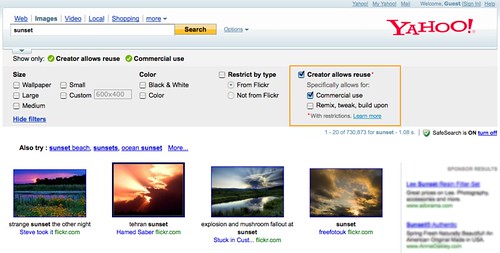
 into your Twitter stream and Twitter followers. With TwitIQ you get:


 Have you ever thought about the hottest tech companies of 2009 ? Despite of having toughest time to survive in this economic downturn, there are many companies still manage to be there in the list of hottest tech company of 2009 in published by
