"Interesting stuff of the Technology, Products and Web 2.0..."

Showing posts with label Google. Show all posts

Sunday, September 26, 2010

Orkut Is Hit by ‘Bom Sabado’ Virus

‘Bom Sabado’ virus hit the popular social networking site orkut, owned by Google. Lots of orkut users are affected by this virus. Many orkut users find a scrap as “bom sabado” on their scrapbook written by their friends. However this is some kind of virus scrap which automatically written to your friends’ scrapbook.

Bom Sabado means “Good Saturday” in Portuguese. Google has not confirmed about this virus yet on their office blog, however orkut team may be working on this. Data affected by this virus is not clear yet. Users are waiting for official release by google about this virus and worry about their data.

Let hope to hear something soon from Google.

Saturday, May 22, 2010

Google Increases Search Security With Encrypted Google Web Search

When people spend lot of time on the internet, they want more control over who access their communication. There are may internet services which provides security using secure http connection i.e. https which uses Secure Socket Layer (SSL) connections to encrypt information that travel between your computer and the services. Banking and e-commerce websites use this technology to secure data communication.

Years ago Google added SSL encryption to products ranging from Gmail to Google Docs and others. Like banking and e-commerce sites, Google’s encryption extends beyond login passwords to the entire service. This session-wide encryption is a significant privacy advantage over systems that only encrypt login pages and credit card information.As a part of continuous improvement, google rolled out a choice to search more securely at: https://google.com

When you search on https://www.google.com, an encrypted connection is created between your browser and Google. This secured channel helps protect your search terms and your search results pages from being intercepted by a third party on your network. The service includes a modified logo to help indicate that you’re searching using SSL. Remember to check the start of the address bar for “https” and your browser lock indicators:

This release comes with a “beta” label for a few reasons. First, it currently covers only the core Google web search product. To avoid misunderstanding, when you search using SSL, you won’t see links to offerings like Image Search and Maps that, for the most part, don’t support SSL at this time. Also, since SSL connections require additional time to set up the encryption between your browser and the remote web server, your experience with search over SSL might be slightly slower than your regular Google search experience. What won’t change is that you will still get the same great search results.

A few notes to remember: Google will still maintain search data to improve your search quality and to provide better service. Searching over SSL doesn’t reduce the data sent to Google — it only hides that data from third parties who seek it. And clicking on any of the web results, including Google universal search results for unsupported services like Google Images, could take you out of SSL mode.

To learn more about using the feature, refer to our help article on search over SSL.

Sunday, March 28, 2010

Orkut Made It Easy To Add Images To Your Scraps!

Till now it was little tricky to add images to your orkut scrap. With the recent changes, new orkut brings this feature back which enables you to add images to your scrap easily.

To add images to your scraps, first click the text box to write and edit a message. You'll then see customization options, such as font color and emoticons. Click the image icon to add an image to your your scrap:

You can upload images from your computer, add from your Picasa Web Albums, or search for them in Google Images.

Related Post:

Saturday, March 20, 2010

Smart Rescheduler for Google Calendar

Google has recently added a Smart Rescheduler in Google Calendar which is a Google Lab output. People spend lot of time in checking calendar, scheduling or rescheduling meetings, investigating other people's calendars, finding replacement conference rooms and rescheduling conflicts.

In order to help people, Google came up with a gadget called Smart Rescheduler to help you re-schedule an event by analyzing everybody's schedule, evaluating conflicts, obtaining conference rooms and proposing the best meeting times.

It uses some of Google's search experience to the problem of scheduling. Google experimented with using ranking algorithms to return the most relevant meeting times based on specified criteria like attendees, schedule complexity, conference rooms, and time zones. Just like Google search ranks the web, scheduling search algorithm returns a ranked set of the best candidate dates and times.

Once you turn it on, just select an event you'd like to reschedule, then click "Find a new time...":

You'll see ranked list of possible times for your meeting. By investigating the calendars others have shared with you, Google Calendar can make some educated guesses about how easy it might be to reschedule a conflicting meeting and even find you a replacement conference room nearby. This process is 100% automated — no Google employees are doing any work behind the scenes. You can refine the results by marking people as optional, changing the meeting duration, ignoring certain conflicts, or specifying the earliest and latest times you'll accept. The results will immediately update to reflect your new requirements.

Thursday, November 26, 2009

Send Attachment via Gmail While You Are Offline

Gmail offers lots of useful feature for personal as well as business use. Recently gmail team has announced the addition of a new feature which enables users to send attachments even when they are offline. This is one of the most requested features for Offline Gmail to include attachments in messages composed while offline.

Now attachments work just the way you would expect them to whether you are online or offline (with the exception that when you're offline you won't be able to include inline images). Just add the attachment and send your message.

If you have Offline Gmail enabled, you'll notice that all your mail now goes through the outbox, regardless of whether you're online or offline. This allows Gmail to capture all attachments, even if you suddenly get disconnected from network. If you're online, your mail will quickly be sent along to its destination.

Visit the Labs tab and follow these instructions to get started:

  1. Select Enable next to Offline Gmail.
  2. Click Save Changes.
  3. After your browser reloads, you'll see a new "Offline" link in the upper righthand corner of the Gmail page, next to your username. Click this link to start the offline set up process and download Gears if you don't already have it.

Tuesday, November 17, 2009

Google Now Provides New Site Hierarchies In Search Results

When you search something on Google, Google usually shows a green web address, or URL, at the bottom of each search result to let you know where you're headed. Today Google is rolling out an improvement that replaces the URL in some search results with a hierarchy showing the precise location of the page on the website.

The new display provides valuable context and new navigation options. The changes are rolling out now and should be available globally in the next few days.

Some web addresses help you understand the structure of the site and how the specific page fits into the site hierarchy. For example, consider a search for the biography of Vint Cerf (Google's Internet Evangelist). The URL for one result, "www.google.com/corporate/execs.html," shows that the page is located in a page about "execs," under "corporate," which is on the "google.com" site. This can provide valuable context when deciding whether to click on the result.

Often, however, URLs are too long, too short, or too obscure to add useful information. For example, consider this result from ProductWiki for the query [spidersapien reviews]:

The URL of this result is "www.productwiki.com/spidersapien," which doesn't provide much additional information about the site or this result. Now take a look at the result with the new site hierarchy display:

The new text provides useful information about the page. You can tell that the ProductWiki site has information about many different products, organized in different categories, and you can even tell that Spidersapien is a robot toy.

In addition, each phrase in the green line is actually a link. For example, clicking on "Toys & Games" takes you to ProductWiki's listing page for all toys, and clicking on "Robots" takes you to a list of their robot toys. This way if you realize that you're interested in a more general category than this specific product (there are a lot of cool robot toys out there) you can easily access information on broader topics.

The host and domain for the site (in this case www.productwiki.com) will always be shown, so you always know what website you're going to before you click. There's not always enough room to show the complete hierarchy, so sometimes we use ellipses to replace some of the intermediate levels, like in this result for [how to make granola]:

The information in these new hierarchies come from analyzing destination web pages. For example, if you visit the ProductWiki Spidersapien page, you'll see a series of similar links at the top, "Home> Toys & Games> Robots." These are standard navigational tools used throughout the web called "breadcrumbs," which webmasters frequently show on their sites to help users navigate.

Friday, October 30, 2009

Google Introduced AdWords Comparison Ads Making Comparison Of Multiple, Relevant Offers More Easy

Google announced a new feature of AdWords called AdWords Comparison Ads, which lets users compare multiple, relevant offers more easily. Comparison Ads is part of Google’s continuing effort to make ads more relevant and useful to users and to help you, advertisers, reach the people who are most interested in your products and services.

AdWords uses a host of targeting and relevancy signals to determine the best ads for each query. However, sometimes a user's query doesn't provide enough information to confidently predict what they want. For example, users who search for "mortgage." Do they want a new home loan or a refinance? Do they want a fixed rate or an adjustable rate loan? Comparison Ads improves the ad experience on Google.com by letting users specify exactly what they are looking for and helping them quickly compare relevant offers side by side.

With Comparison Ads, you can also target your offers at a more granular level, leading to more valuable, qualified leads. To see how it works, let's use mortgage example. Users searching for "mortgage" on Google.com may see a promotion from Comparison Ads prompting them to select the type of loan they are looking for and to compare various rates.

If they click the promotion, users are taken to a page with more detailed sponsored results. They can choose directly from the offers listed on that page, or they can further refine their search by providing additional information like income and home value. By giving users the ability to refine their search on a number of relevant attributes, it can show more targeted ads and provide more valuable leads.

Once users find an offer that matches their specific needs, they can either call you directly or request a quote. If a user requests a quote, Google automatically anonymizes the user's phone number and sends you a unique code that you can use to contact the user. You only pay if a user calls the phone number on your offer or fills out a form to request a quote.

While Comparison Ads is still an early-stage feature, Google has focused on a number of ways to enhance the user experience:

  • Speed -- Comparison Ads shows targeted offers in less than a second. There are no long forms for users to fill out - Users see specific offers immediately and only need to fill in additional information if they wish to further refine their results.
  • Transparency -- Comparison Ads only shows real products. There are no teaser rates, or bait and switch offers. Comparison Ads also standardizes the information presented to users, making it easy for them to sort and compare offers on a side by side basis.
  • Privacy -- Comparison Ads won't send advertisers any user information, including anonymized phone numbers, unless the user explicitly requests more information about an advertiser's offer.

At this time, Comparison Ads will only show to a small number of users in select U.S. states and is only available to a limited number of advertisers in the mortgage/refinance space. Over time, Google will increase the number of users who see Comparison Ads offers as well as the number of advertisers able to participate.

Tuesday, October 06, 2009

What Is A Browser ?

browsers Web browser is one of the most-used programs on computers. Lots of our time each day is spent online, and every page on the web is experienced through the browser. Unfortunately, most people don't realize that there are many browsers out there, which differ on features like speed, security and extensibility.

Jason Toff, associate product marketing manager at Google conducted a survey of friends to know what they think about web browser. He got the following results:

He has created a one minute video to understand what are web browsers:

He has also created a simple site, WhatBrowser.org, that gives even more information about browsers. On this site, you can see which web browser you're using, explore links to browser diagnostic tests and read some useful tips for getting the most out of your browser.

Tuesday, September 29, 2009

Google Trends With Google Search

Google released a new web search feature which will help to stay in touch with latest trends on the web. Google trends is now part of google web search. Google Hot Trends lists the fastest rising searches on the web at any given hour. Now, when you search Google.com and your query matches one of the top 100 fastest-rising search terms, it will show you a graph at the bottom of page, with more information - like how popular the query is, how fast it's rising over time, and other useful data.

Below is a picture of what you'd find today if you searched for william h macy, which is the top in google trends today (But make sure you search for these examples today - nothing stays hot for long.)

image

Google has also reduced the number of trends listed on the Google Hot Trends homepage to 40 from 100. This feature, however, will show up for any query that matches the top 100. This new feature is available in the U.S. and Japan.

Saturday, September 26, 2009

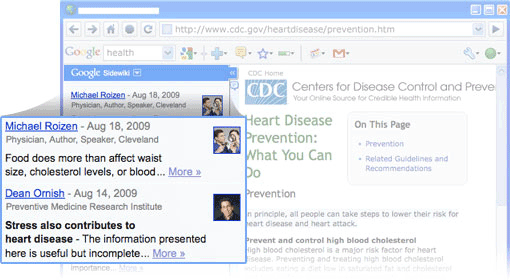
Contribute Helpful Information To Any Webpage With Google Sidewiki

When you are searching for some topic and arrived to some webpage. After going through that webpage, you find that you can add some more useful information on that topic which will help others who are looking for the same information.

What if everyone had an easy way of sharing their insights with you about any page on the web? What if you could add your own insights for others who are passing through?

Now you can. Google announced Sidewiki, which allows you to contribute helpful information next to any webpage. Google Sidewiki appears as a browser sidebar, where you can read and write entries along the side of the page.

Rather than showing most recent entries first, it shows most relevant entries first. Google ranks Sidewiki entries using an algorithm that promotes the most useful, high-quality entries in real-time. It will also take your entry about the current page and show it next to webpages that contain the same snippet of text. For example, an entry on a speech by President Obama will appear on all webpages that include the same quote.

It also brings in relevant posts from blogs and other sources that talk about the current page so that you can discover their insights more easily, right next to the page they refer to.

Google Sidewiki is also available as a feature of Google Toolbar (for Firefox and Internet Explorer) and it will be soon available in Google Chrome and elsewhere too.

For developers, Sidewiki API are available to let anyone work freely with the content that's created in Sidewiki.

Friday, September 18, 2009

Google Opens New DoubleClick Ad Exchange To Help Advertisers And Publishers

double click Today, Google announced that it is opening the new DoubleClick Ad Exchange, a real-time marketplace for display advertising space. By establishing an open marketplace where prices are set in a real-time auction, the Ad Exchange enables display ad space to be allocated much more efficiently and easily across the web.

"Better technology can help make display advertising work better for all involved," said Neal Mohan, Vice President of Product Management at Google. "We're focused on growing the display advertising pie for everyone. The DoubleClick Ad Exchange is a major part of that goal."

The new DoubleClick Ad Exchange has been rebuilt using Google's technology and infrastructure. It contains a wide variety of key features that will help improve returns for advertisers and enable publishers to get the most value out of their online content.

image

Key benefits for sellers include:

  • Real-time dynamic allocation to maximize yield. Publishers can automatically generate the highest return for every impression, using real-time data and bids to allocate ad space to the sales channel that pays the most at that second.
  • Access to many more advertisers. The Ad Exchange offers publishers access to new buyers, including AdWords advertisers, bringing higher quality ads and more competition for ad space on their sites.
  • Hassle-free payments managed by Google. It manages the billing and payments from networks so publishers get one monthly payment and minimize having to manage multiple relationships.
  • Greater controls. Publishers can decide what advertisers, networks, ad formats, and bid types to allow.
  • New easy to use interface with enhanced reporting. It uses the simplicity of Google's user design principles to help publishers easily find out how their sites are performing, to help them make the right decisions about their ad space.

Key benefits for buyers include:

  • Access to more publishers and more ad space. Hundreds of thousands of AdSense publisher sites are now available on the Ad Exchange to Google-certified ad networks. And as more publishers join the Ad Exchange to take advantage of its yield management capabilities, more high quality inventory is being added all the time.
  • Real-time bidder. The Ad Exchange has a new real-time bidder feature that allows buyers to use their own data, optimization and ad serving technologies to bid on their desired inventory on an impression-by-impression basis, choosing only the sites, audiences, or particular type of ad space they want to reach.
  • New easy to use interface with enhanced buyer reporting capabilities. Redesigned reports are simple to use and understand, so buyers can easily see how their campaigns are performing to help them make the right decisions.
  • More control and precision. Buyers control where their ads appear and don't appear. They can use frequency capping, pacing and other features to precisely control ad delivery.
  • Centralized clearing system. Google makes all payments to publishers, reducing complexity with a single billing and payment point. Buyers benefit from managing one business relationship instead of many.
  • A new API - Ad networks and agency networks will have access to an API which enables them to integrate their own functionality and systems when working with the Ad Exchange.

Features of the new Ad Exchange include a completely new interface; a "real-time bidding" feature to allow ad networks to use their own technology to bid on an impression-by-impression basis; a "dynamic allocation" system, which automatically generates online publishers the highest return for every impression by allocating ads to the highest-paying sales channel, based on real time data; more granular publisher and advertiser controls; payments and clearing managed by Google; and a new API to allow ad networks to extend the functionality of the Ad Exchange.

Below video gives a look at Google's plans to make display advertising more useful to users, advertisers, and publishers.

Additional information:

Wednesday, September 16, 2009

Google Acquires reCAPTCHA To Improve Books and Newspaper Scanning

Google today announced that they have acquired reCAPTCHA, a company that provides CAPTCHAs to help protect more than 100,000 websites from spam and fraud. reCAPTCHA is a free CAPTCHA service that helps to digitize books, newspapers and old time radio shows.

Since computers have trouble reading squiggly words like these, CAPTCHAs are designed to allow humans in but prevent malicious programs from scalping tickets or obtain millions of email accounts for spamming. But there’s a twist — the words in many of the CAPTCHAs provided by reCAPTCHA come from scanned archival newspapers and old books. Computers find it hard to recognize these words because the ink and paper have degraded over time, but by typing them in as a CAPTCHA, crowds teach computers to read the scanned text.

Many of us have seen such CAPTCHA while entering comments to some blogs or websites :

image

In this way, reCAPTCHA’s unique technology improves the process that converts scanned images into plain text, known as Optical Character Recognition (OCR). This technology also powers large scale text scanning projects like Google Books and Google News Archive Search. Having the text version of documents is important because plain text can be searched, easily rendered on mobile devices and displayed to visually impaired users.

Google will apply the technology within Google not only to increase fraud and spam protection for Google products but also to improve their books and newspaper scanning process.

You can see more details about reCAPTCHA here.

Tuesday, September 15, 2009

Google Fast Flip Makes Your Online News Reading Experience Faster

One problem with reading news online today is that browsing can be really slow. A media-rich page loads dozens of files and can take as much as 10 seconds to load over broadband, which can be frustrating. To overcome this, Google came up with innovative web application called “Goole Fast Flip”.

Google Fast Flip is a web application that lets users discover and share news articles. It combines qualities of print and the Web, with the ability to "flip" through pages online as quickly as flipping through a magazine. It also enables users to follow friends and topics, discover new content and create their own custom magazines around searches.

Like a print magazine, Fast Flip lets you browse sequentially through bundles of recent news, headlines and popular topics, as well as feeds from individual top publishers. As the name suggests, flipping through content is very fast, so you can quickly look through a lot of pages until you find something interesting.

At the same time, it provides aggregation and search over many top newspapers and magazines, and the ability to share content with your friends and community. Fast Flip also personalizes the experience for you, by taking cues from selections you make to show you more content from sources, topics and journalists that you seem to like.

In short, you get fast browsing, natural magazine-style navigation, recommendations from friends and other members of the community and a selection of content that is serendipitous and personalized.

To build Google Fast Flip, Google has partnered with three dozen top publishers, including the New York Times, the Atlantic, the Washington Post, Salon, Fast Company, ProPublica and Newsweek. These partners will share the revenue earned from contextually relevant ads. This gives publishers an opportunity to introduce new readers to their content.


Mobile version of Fast Flip is also available with tactile page flipping for Android-powered devices and the iPhone, so you can browse on the go. This is accessible at the same address.

Tuesday, September 08, 2009

Orkut Now Suggests Friends

Orkut already has a search feature which one can use to find friends. However when you start searching for someone, you might get lots of profile having the same name and finally you will end up with going through each of them. Up until now, there hasn't been an easy way to find your friends that you wouldn't think to search for.

In order to help users, orkut added a new suggestion feature which offers suggestions of people you might want to be friends with on your orkut home page. With the new orkut friend suggestions feature, it automatically creates a list of people on orkut who you might know, and display it right below your birthday reminders.

Not only does the friend suggestions feature make it easy to find new friends, it also lets you add them to your friends list and send them a short message without ever leaving your home page. Just click the "add as friend" link below your friend's photo, customize the message you want to send (or use the predefined message we've created for you), and click "send invite."

Originally this feature was developed to help people who were new to orkut to quickly and easily find all of their friends who had already joined. Now this feature is made available to all users.

Friday, September 04, 2009

Tracks Google Search Traffic Across Specific Sectors Of The Economy With Google Domestic Trends

Google today announced the launch Google Domestic Trends on Google Finance. Google Domestic Trends tracks Google search traffic across specific sectors of the economy. The changes in the search volume of a given sector on google.com may provide useful economic insight.

Google has created 23 indexes that track the major economic sectors, such as retail, auto and unemployment. Each index value is baselined at 1.0 on January 1, 2004 and is calculated and displayed on the Google Finance charts as a 7-day moving average. You can easily compare actual stocks and market indexes to these Google Trends on the charts.

For example, the Google Luxuries Index tracks queries like [jewelry], [rings], [diamond], [ring], [jewelers], [tiffany] and so forth. As you can see from the screenshot below, this index has seasonal spikes in December — however, in the last two years there has been a pronounced decrease as the recession made consumers wary of spending on luxury items.

The Auto-Buyers Index is also interesting, especially the dramatic 40% increase correlated with the launch of the Cash for Clunkers program in the U.S.:

These charts let you easily compare actual stocks and market indexes to Google Trends. And the data for these indexes are available for download — so you can use it with your own models.

More details can be found on Google Finance Blog.

Friday, August 21, 2009

Gmail Support For Emailing Task List

Gmail has many cool features and adding more and more. Today Gmail team has announced addition of new export feature which allows you to email your task list.

Like most Tasks features, "Email task list" can be found in the Actions menu.


Clicking on it will open a new compose window with the contents of your current task list. This works in all views (my order, sort by date, completed), so to email your mom to explain why you've been so busy and haven't been able to return her calls, just choose "View completed tasks" from the Actions menu, then "Email task list" and send away.

(Note: this may not be very convincing if you haven't actually checked anything off your list recently.)

Wednesday, August 19, 2009

Orkut Chat With New Features

Last November, orkut has integrated Google Talk feature which allows you to chat directly with your orkut friends whenever they come online. After that orkut launched an orkut chat roster. Yesterday, orkut team has announced the addition of few more features that will make your chat experience more dynamic.

  • Chat pop out: allows you to view individual chats in separate windows

  • Group chat: lets you chat with multiple friends at the same time
  • Chat list: makes it easy to see which of your friends are online, whether they're logged in via orkut, Gmail, iGoogle, or Google Talk

Check out this short instructional video:

Sunday, August 09, 2009

What’s Wrong With Google Earth ?

Recent update to google earth data causes some issue with its map. New map shows some part of Arunachal Pradesh, India as a part of China. Google admitted this mistake and apologised for the same.

A spokesperson for Google said in a statement that “Earlier, this week, as part of routine update to Google earth, we published new data for the Arunachal Pradesh region that changed the depiction of certain place names in the product. The change was a result of a mistake in our processing of new map data,”

Google Earth is a free tool which enables you to view satellite imagery, maps, terrain, 3D buildings, from galaxies in outer space to the canyons of the ocean. You can explore rich geographical content, save your toured places, and share with others.

More info :

Thursday, August 06, 2009

New Beta Version of Chrome Is More Faster & Colourful

Google yesterday rolled out new beta version of Chrome which shows almost 30% improvement in speed. Also New Tab page and the Omnibox features are also improved in this version. Plus, we decided to add a little bit of style by allowing you to deck out your browser with colors, patterns, and images. Moreover, Chrome is now colourful. Yes, this beta version now allows you to deck out your browser with colors, patterns, and images.

Customize the new New Tab page

The New Tab page has been one of the most popular features in Google Chrome. Now you can bump up something dignified and refined into that top Most Visited slot with a simple click and drag of your mouse. You can pin website thumbnails to a particular spot so they don't disappear even if your browsing habits change. Last but not least, you can hide parts of the page if you don't want to see them using the layout buttons on the top right of the New Tab page.

Rearrange website thumbnails on the New Tab page by clicking and dragging thumbnails

Pin websites thumbnails to a particular spot

Try the latest and greatest Omnibox

The Omnibox is indisputably an important part of Google Chrome - it helps you get to the sites you're looking for with just a few keystrokes. In this release, presentation of the drop-down menu has been optimized and little icons are added which will help you distinguish between suggested sites, searches, bookmarks, and sites from your browsing history.


Tweak the chrome of Google Chrome

This version has added a little bit of style by allowing you to add a theme to your browser. So, if you've been dying for a browser that reminds you of the Friendly Confines, or if you just want the comfort of your favorite blanket when you're browsing the web, now you can have it. Of course, if baseball or quilting isn't your thing, you can change the theme of your browser by visiting the Themes Gallery.


A sneak peek at the woody "Desktop" theme


...and your favorite website thumbnails basking on a grassy field

Experience HTML5 capabilities

One can experience HTML5 capabilities into this beta release, including video tag functionality and web workers.

Speed, Speed, and more Speed

Beyond the improvements in JavaScript execution in this latest beta, there are a host of other improvements that should help Google Chrome make the most of your network connection. For example, when you open a new web page while other web pages are still loading, Google Chrome is now smarter about prioritizing the requests for the new page -- for instance, fetching text, images, and video for your new page -- ahead of the requests from the older pages. Loading pages on this beta release should also be faster than ever with DNS caching, more efficient DOM bindings, and using V8 for proxy auto-config.

Tuesday, July 28, 2009

Mobile Version Of Gmail Becomes Smart With “Smart Links”

Having small screens in mobile devices, it would be many times not much helpful when email contains a long url. Google released that and came up with a new feature called “Smart Link” for mobile version of gmail. Consider a long link such as this Google Maps link:

Not only is the link taking up an unnecessarily large amount of space, but it's not easy to find the address that's hidden in the middle of the link. To solve this problem, mobile version or gmail now shorten the link and automatically convert raw links into named links, which they call "Smart Links". So instead of seeing that long link to Google Maps, you're going to see the link renamed to the actual address:

Clicking on it still takes you to the same Google Maps page, but now the link is much shorter and the important information is more visible!

Here's a list of links that are currently supported :

  • Google Maps address queries
  • Google Maps directional queries (with one destination)
  • Google Sites webpages
  • YouTube videos

Support for more link types will be rolled out soon, such as Google Docs. Note that Smart Links work only in plaintext emails right now.

To try out Gmail for mobile, visit gmail.com in your mobile browser. This version of Gmail for mobile supports iPhone/iPod touch OS 2.2.1 or above, as well as all Android-powered devices, and is available for US English only.